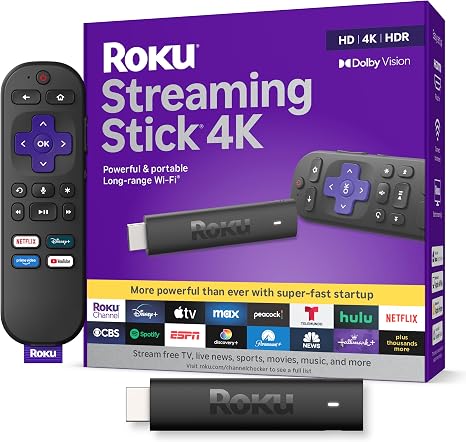
Roku Streaming Stick
Make Movie Night Easy with the Compact Roku Streaming Stick 4K
Want an easy way to bring streaming to a TV without adding a bulky box? The Roku Streaming Stick 4K (model 3820) pairs a compact, behind-the-TV design with a voice remote, long-range Wi-Fi receiver, and support for 4K, Dolby Vision, and HDR10+ on compatible TVs. For renters and families, it’s a simple-to-move setup with free channels to explore alongside streaming apps. 1
A tidy fit for shared spaces
The stick plugs into your TV’s HDMI port and sits out of sight, helping keep a bedroom, living room, or rental’s entertainment area uncluttered. Its slim design is made not to block neighboring HDMI ports, which is handy when a game console or another device shares the back of the TV. Roku lists it at just 3.7 inches long. 1
Setup involves connecting the stick to HDMI, powering it with the included cable and adapter, selecting the TV input, and joining Wi-Fi. That makes it a practical option for moving a streaming setup between TVs, though you’ll need to reconnect it and sign in as needed. 2
4K picture, when your TV supports it
On a compatible 4K HDR television, the device supports up to 4K at 60 frames per second, Dolby Vision, and HDR10+. That can make it a useful upgrade if your household already owns a compatible screen—or a way to add 4K streaming to one later. On an HD TV, it still works, but you won’t get 4K or HDR picture quality. 1 2
One remote and plenty to browse
The included Roku Voice Remote has TV power and volume controls, so it can reduce remote juggling for family movie nights. Roku also highlights more than 500 free TV channels, including live news, weather, and sports coverage. Other streaming apps are available too, but access to particular services or content may require separate subscriptions. 1
Check the connection before you buy
You’ll need an available HDMI port and a reliable Wi-Fi connection. To enjoy 4K or HDR, your TV must support those formats; Roku also specifies an HDMI input supporting HDCP 2.2 for 4K/HDR compatibility. The included long-range Wi-Fi receiver is built into the USB power cable, so Roku recommends using the supplied cable. 2
If you want a small, straightforward way to bring streaming apps and free channels to a compatible TV, the Roku Streaming Stick 4K is worth a look. Check your TV’s ports and picture capabilities first, then see whether it fits your household’s setup.
Sources
As an Amazon Associate I earn from qualifying purchases.See current price and options on Amazon.com.